
Most small business owners find out their bank reconciliation is off in the worst possible way — a check bounces, a vendor calls about a “missing” payment, or the year-end tax prep turns up a $600 gap nobody can explain. A bank reconciliation template fixes that by giving you a repeatable process: match your bank statement against your own books every month, and catch the difference while it’s still a five-minute fix instead of a week of digging through old statements.
The free bank reconciliation template below does the matching for you. Enter your bank statement balance and your book balance, list anything still in transit, and it calculates both adjusted balances and tells you — in plain language — whether they match.
What’s Inside the Free Bank Reconciliation Template
The download has three tabs. The Instructions tab walks through how to use the other two. The Bank Reconciliation tab is the actual calculator — enter your bank statement balance and book balance, list your deposits in transit, outstanding checks, and any bank-only adjustments, and it totals everything and tells you whether you’re reconciled. The Monthly Tracker tab logs all twelve months in one place, so a recurring problem (the same vendor’s checks always taking three weeks to clear, say) becomes obvious instead of getting lost between separate spreadsheets.
Understanding Bank Reconciliation
What a Bank Reconciliation Actually Does
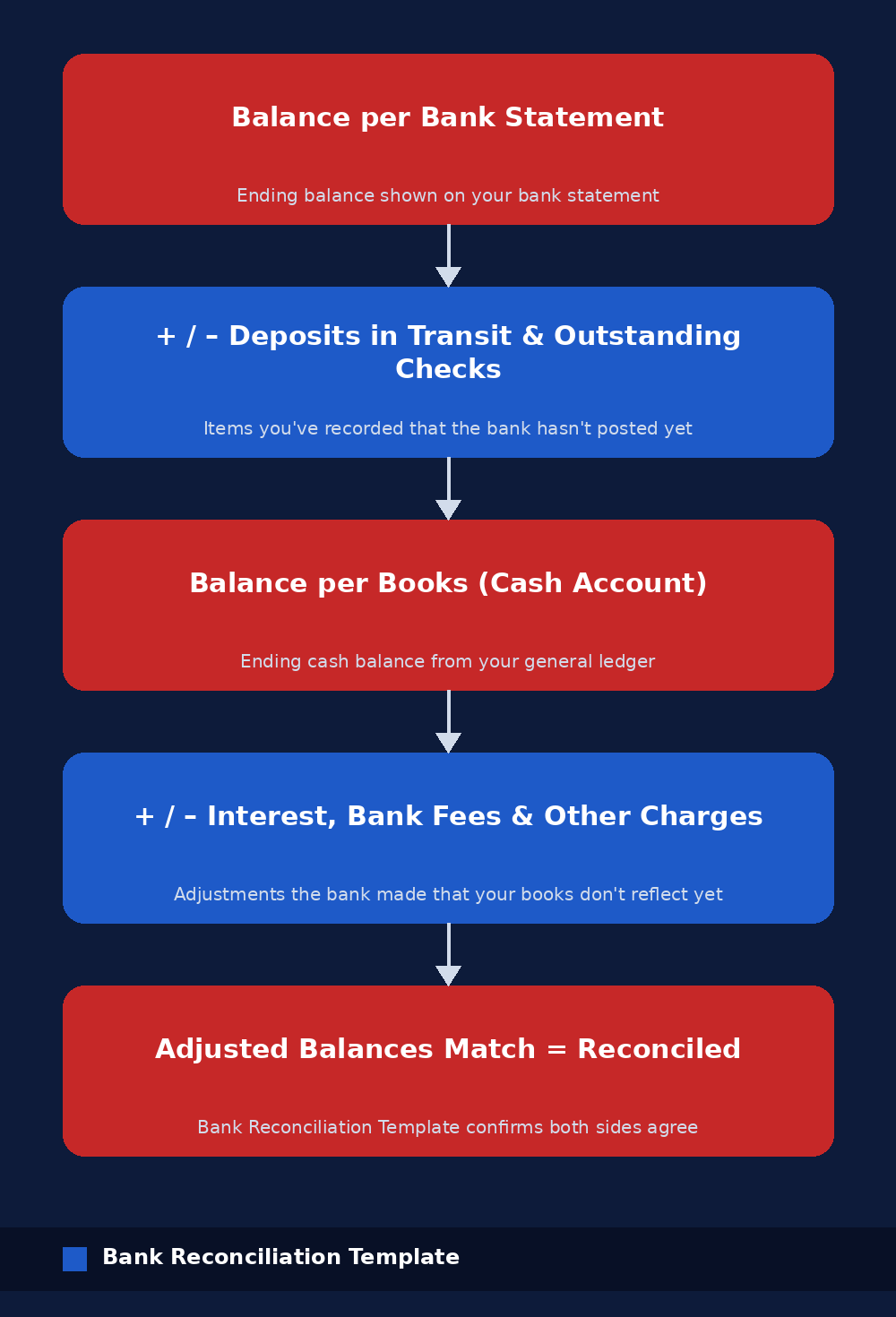
A bank reconciliation compares two numbers that should, in theory, describe the same cash — the balance the bank says you have, and the balance your own books say you have — and explains every dollar of difference between them. The two rarely match on the day you check, and that’s normal: a check you wrote last week might not have cleared yet, or the bank might have charged a fee you haven’t recorded. The reconciliation isn’t about forcing the numbers to agree; it’s about accounting for every timing difference until both sides land on the same adjusted balance.
Why It Matters Beyond Catching Errors
A monthly bank reconciliation template catches more than typos. It’s how you find bank fees you didn’t authorize, a duplicate payment that went out twice, a deposit that never actually hit your account, or — in the worst case — fraudulent transactions on an account nobody’s been watching closely. It’s also the control your accountant, lender, or a future auditor will ask about first, because a business that reconciles every month is a business whose books can be trusted without a lot of extra digging.
How to Reconcile Your Bank Account, Step by Step
Step 1: Gather Your Statement and Your Books
Pull the bank statement for the period you’re reconciling and your cash account balance from your books (QuickBooks, Xero, or a plain spreadsheet ledger all work) as of that same ending date. Reconciling against the wrong date is the single easiest way to make two correct sets of numbers look like they don’t match.
Step 2: Match the Easy Stuff First
Go line by line through the bank statement and tick off every deposit and withdrawal that also appears in your books. Most of a typical month will match immediately. What’s left over on each side — the bank has an item your books don’t, or your books have an item the bank hasn’t posted yet — is what the rest of the reconciliation is built to explain.
Step 3: List Deposits in Transit
A deposit in transit is money you’ve recorded in your books — a check you deposited, a cash drop — that the bank hasn’t posted yet, usually because it was made near the end of the statement period. Add these to the bank statement balance in the bank reconciliation template; they’ll clear on next month’s statement, but for this month they belong in the adjustment.
Step 4: List Outstanding Checks
Outstanding checks are the mirror image: checks you’ve written and recorded in your books that haven’t been cashed yet, so the bank hasn’t subtracted them. Subtract the total from the bank statement balance. A check that stays outstanding for months is worth a phone call — it may have been lost and need to be reissued.
Step 5: Adjust Your Books for Bank-Only Items
Some items only ever show up on the bank statement first — interest earned, a monthly service fee, a wire transfer fee, or an NSF charge for a check that bounced. Add the credits and subtract the charges from your book balance so your general ledger catches up to what the bank already knows.
Step 6: Confirm the Adjusted Balances Match
Once both sides are adjusted, the Adjusted Bank Balance and Adjusted Book Balance in the bank reconciliation template should be identical. If they are, you’re reconciled for the month. If they aren’t, the difference is a dollar amount you can trace — not a mystery, just an item you haven’t found yet.
Common Bank Reconciliation Mistakes
Reconciling against the statement date instead of your own books’ cutoff date. This alone accounts for most reconciliations that “don’t balance” on the first try — the two sides were never describing the same day in the first place.
Recording the net deposit instead of the gross amount. If a customer pays through a processor that takes a fee before the money lands in your account, the bank shows the net deposit while your invoice says the gross amount — record both the deposit and the processing fee separately, or the two sides will never tie out cleanly.
Letting a small difference ride “until next month.” A $4 gap that goes uninvestigated has a way of becoming a $400 gap once three or four small unreconciled items stack up together, and by then nobody remembers which month introduced which error.
How to Use It
Open the Instructions tab first — it explains the legend and walks through each section in order. Then go to the Bank Reconciliation tab, clear out the sample numbers in the yellow cells, and enter your own bank statement balance, book balance, and any outstanding items. The Status cell tells you immediately whether you’re reconciled. Log the result on the Monthly Tracker tab before you move on, so next month takes minutes instead of starting from scratch.
Letting the wrong person own the whole process is a related risk. In a very small business it’s common for one person to write checks, record them, and reconcile the account — which works fine until it doesn’t, since that same person is in a position to hide a mistake or worse. Even a light second look from an owner or a bookkeeper who didn’t originate the transactions closes most of that gap.
Frequently Asked Questions
What’s the difference between a bank reconciliation and a bank statement?
A bank statement is just the bank’s record of activity on your account. A bank reconciliation template is what you build on top of it — comparing that statement to your own books and explaining every difference between the two, which the statement alone never does.
How often should I reconcile my bank account?
Monthly, at a minimum, timed to your bank statement’s closing date. A business with high transaction volume or multiple accounts often reconciles weekly, since a longer gap between reconciliations makes it harder to remember what an unexplained item actually was.
What if my adjusted balances don’t match?
Recheck your math first, then look for a transaction recorded on the wrong side (a deposit entered as a withdrawal, for example) or one you haven’t recorded at all. The exact dollar difference is often a clue — a missing $15 charge is more likely a fee than a data-entry error, while an odd number like $127.43 often points to one specific missed transaction.
What’s a deposit in transit?
It’s money you’ve already recorded as received — a check deposited, cash dropped at the bank — that hasn’t shown up on the bank statement yet, usually because it was deposited close to the statement’s cutoff date. It clears on the following statement, so a bank reconciliation template adds it back to the bank side for the current month.
Do I need accounting software to do a bank reconciliation, or is Excel enough?
Excel is enough for most small businesses, especially with a bank reconciliation template that already has the formulas built in. Accounting software like QuickBooks or Xero automates part of the matching, but plenty of well-run small businesses reconcile a single operating account in a spreadsheet every month without any issue.
What’s the difference between bank reconciliation and account reconciliation?
Bank reconciliation refers specifically to cash accounts against a bank statement. Account reconciliation is the broader term — the same match-and-explain-the-difference process applied to any balance sheet account, including accounts payable, accounts receivable, or a loan balance, not just cash. The Investopedia overview of account reconciliation covers the wider version if you’re reconciling more than just cash.
Can I reconcile a business credit card the same way?
Yes — the same logic applies, comparing the statement balance to what you’ve recorded in your books, though you’re usually matching charges and payments rather than deposits and checks. Many businesses run a separate reconciliation for each credit card and each bank account rather than combining them into one sheet, since mixing account types tends to make the outstanding-items list harder to read.
Download the Free Bank Reconciliation Template
Download the free Bank Reconciliation Template below — no email signup required. It’s pre-loaded with sample numbers so you can see exactly how a completed reconciliation looks before you clear it out and enter your own.
Want new templates emailed to you?
No spam. Unsubscribe anytime. Downloads never require this.
Looking for more small business finance tools? Check out our Working Capital Calculator, Cash Flow Forecast Template, and our Accounts Payable Aging Report for tracking what you owe alongside what’s in the bank.

Good resource! A bank reconciliation template can make the process much more organized and easier to follow. Having a consistent format also makes it simpler to spot discrepancies and keep records accurate.
for accurate record keeping this is the most helpful format