
Ask most small business owners how much revenue is sitting in unpaid customer invoices, and they can usually give you a total. Ask how much of that total is 60 days late, and from which customer, and the answer is usually a shrug. An accounts receivable aging report is what closes that gap — it takes every invoice you’ve sent that hasn’t been paid and sorts it by how overdue it is, so “customers owe us some money” turns into “Palmetto Logistics owes us $6,450 that’s been sitting for 41 days.”
The free accounts receivable aging report template below builds that view automatically. Enter your open invoices — customer, invoice date, due date, amount — and it buckets each one into Current, 1-30, 31-60, 61-90, or 90+ days past due, totals everything by bucket and by customer, and charts it so a slowing customer or a growing collections problem is obvious at a glance instead of buried in a spreadsheet of dates.
What’s Inside the Free Accounts Receivable Aging Report Template
The download is a single Excel file with two tabs. The first is the AR Aging Report itself: a report date you control, an open invoice table where you list each customer invoice, and an aging summary above it that totals what’s owed in each bucket automatically, with a bar chart and a flagged “% past due” figure. The second tab is a Customer Summary that rolls the same invoices up by customer — total receivable, number of open invoices, and the age of each customer’s oldest invoice — so you can see immediately which customer relationship needs a collections call, not just which invoice.
Understanding the Accounts Receivable Aging Report
What It Actually Shows
An accounts receivable aging report is a snapshot of everything currently owed to your business by customers, organized by how long each invoice has been outstanding rather than by customer or by date alone. It answers three questions at once: how much are we owed in total, how much of that is overdue rather than merely not-yet-due, and is the overdue portion concentrated in one or two customers or spread across many. None of those three questions is answerable from a total receivables balance alone — you need the age of each invoice to get there.
AR Aging vs. AP Aging — Don’t Mix Them Up
Accounts receivable aging and accounts payable aging sound like the same report with the words swapped, and the mechanics are identical, but they answer opposite questions. An accounts receivable aging report, the one this template builds, ages the invoices you sent to customers — it tells you who owes you money and how late they are paying it. An accounts payable aging report ages the invoices vendors sent you — it tells you who you owe and how late you are paying them.
Mixing the two up in conversation with a lender or an accountant is a common enough mistake that it’s worth stating plainly once: receivable is what you’re owed, payable is what you owe. We cover the other side in detail in our Accounts Payable Aging Report Template.
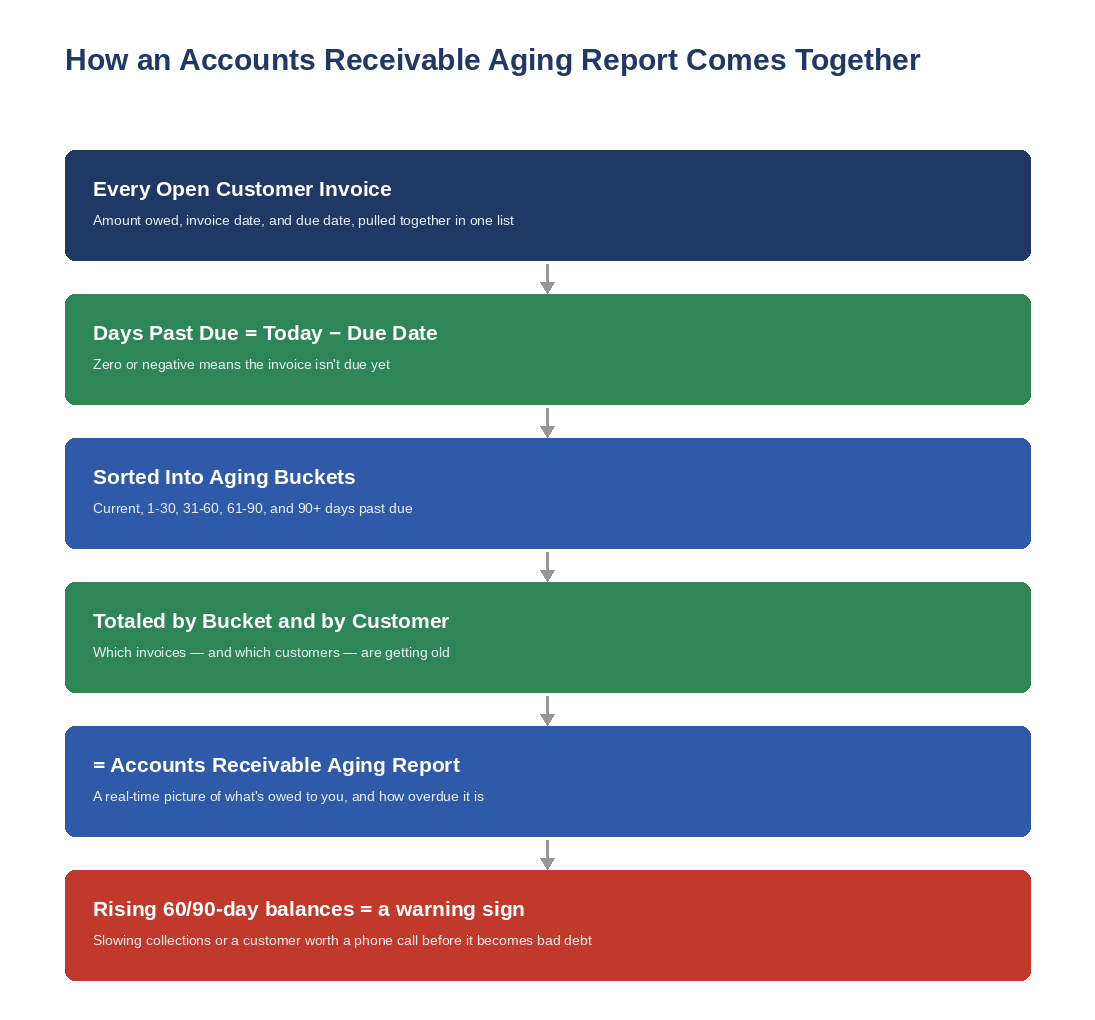
How an Accounts Receivable Aging Report Comes Together
Days Past Due
For every open invoice, days past due is simply today’s date minus the invoice’s due date — not its invoice date. An invoice with 30-day terms issued three weeks ago isn’t past due at all yet; it’s still Current. Days past due only starts counting once the due date itself has passed, and an invoice due tomorrow is treated the same as one due today: zero days past due, not negative.
Aging Buckets
Once every invoice has a days-past-due figure, it gets sorted into a bucket: Current (not yet due), 1-30 days past due, 31-60, 61-90, and 90+. These five buckets are the standard used across accounting software and lender reporting, which is exactly why the template uses them rather than a custom scheme — the numbers will match what your accountant, a lender, or a factoring company expects to see.
Customer Totals
The bucket totals tell you the shape of the problem; the customer totals tell you where it lives. Two businesses can both show 25% of receivables in the 61-90 day bucket, but one has that spread thinly across a dozen customers while the other is owed it all by a single account that’s quietly stopped answering emails. The Customer Summary tab exists specifically to catch the second case before it becomes a bad-debt write-off.
How to Read Your Aging Buckets
A healthy accounts receivable aging report is front-loaded — most of the dollar total sits in Current and 1-30 days, with the balance thinning out fast in the older buckets. That pattern means customers are paying close to on time and collections are working the way they’re supposed to. When the shape inverts — when 31-60, 61-90, or 90+ start holding meaningful dollars — it’s worth treating as a signal rather than a coincidence, for one of three reasons: customers are genuinely slow payers and terms aren’t being enforced, invoices are getting lost, disputed, or never actually delivered to the right contact, or collections has become an afterthought rather than a routine.
As a rough benchmark, most well-run small businesses keep well under 15% of total receivables in the 31+ day buckets combined. That’s not a hard rule — a business that intentionally offers 60-day terms to a large, reliable customer will show older-looking balances that are actually current relative to those terms — but if the percentage is climbing month over month with no such explanation, it’s an earlier and more specific warning than “cash feels tight,” and it usually shows up in the aging report weeks before it shows up in the bank balance.
Common Accounts Receivable Aging Mistakes
Aging from the invoice date instead of the due date. This is the single most common error and it makes every customer look later than they actually are. Terms exist precisely so that an invoice isn’t overdue the moment it’s sent.
Running the report and not acting on the 90+ bucket. An invoice that’s 90 days past due is well past the point where a friendly reminder email will fix it. It usually needs a direct conversation with the customer — about a payment plan, a dispute, or cutting off further credit — not another cycle of being carried forward as “still collectible.”
Only looking at the total, not the customer breakdown. A stable-looking total can hide one customer relationship quietly deteriorating while everything else is paid on time. The Customer Summary tab is there so this doesn’t require cross-referencing two reports by hand.
Letting the report go stale. An aging report is only accurate as of the date it’s run. Checking it once a quarter means three months of drift before a slow-paying customer becomes visible — by which point the balance owed may be too large to comfortably write off if it goes bad.
Confusing “unpaid” with “in dispute.” An invoice held back because of a quality issue or a billing disagreement isn’t the same kind of past-due as one simply sitting unpaid in a customer’s queue. Both belong in the report, but lumping them together in the same bucket without a note can make a resolvable dispute look like a collections failure it isn’t.
How to Use It
Set the Report Date cell to today (or to whatever date you’re reporting as of), then list every open customer invoice in the table below it — customer name, invoice number, invoice date, due date, and amount. The Bucket and Days Past Due columns calculate themselves for every row you add. The Aging Summary and the chart at the top update automatically, and the Customer Summary tab rolls the same data up by customer with no extra entry required. If you’re pulling this together for the first time, your accounting software’s open-invoice or unpaid-customer-invoices report is the fastest source — export it and drop the columns into the template rather than retyping each invoice by hand.
It’s worth running this alongside a Cash Flow Forecast rather than in isolation — the aging report tells you what’s owed to you and how overdue it is, and the forecast tells you what happens to your cash position if a chunk of that 90+ bucket doesn’t come in on schedule.
Frequently Asked Questions
What is an accounts receivable aging report?
It’s a report that lists every unpaid customer invoice and groups it by how long it’s been outstanding — typically Current, 1-30, 31-60, 61-90, and 90+ days past due. It shows total receivables, how much of that is overdue, and which customers it’s owed by, all in one view.
What’s a healthy percentage of receivables in the 90+ day bucket?
Close to zero, as a general rule. Most well-run small businesses keep combined 31+ day balances under roughly 15% of total receivables. A meaningful, growing 90+ day balance is one of the more specific early signs of a collections problem, separate from intentional long payment terms negotiated with a specific customer.
How is an AR aging report different from an AP aging report?
An accounts receivable (AR) aging report ages what customers owe you. An accounts payable (AP) aging report ages what you owe to vendors. The bucket structure is identical; the direction of the money is opposite.
Can I build an AR aging report if I use QuickBooks or another accounting system?
Yes — most accounting software can already generate a version of this report natively. This template is useful even if you have that option: it’s easy to customize, easy to hand to someone outside your accounting system (a lender, a factoring company, an advisor), and doesn’t require software access to check.
How often should I run an AR aging report?
Weekly if collections are a regular part of running the business, and monthly at an absolute minimum. Checking it only at year-end or when cash feels unexpectedly tight means finding out about a slow-paying customer well after the best window to collect from them has passed.
Download the Free Accounts Receivable Aging Report Template
Download the free Accounts Receivable Aging Report template below — no email signup required. It’s pre-loaded with sample customer invoices so you can see exactly how the buckets, totals, and chart work before you clear them out and enter your own.
Want new templates emailed to you?
No spam. Unsubscribe anytime. Downloads never require this.
Looking for more small business finance tools? Check out our Accounts Payable Aging Report Template, Cash Flow Forecast Template, Working Capital Calculator, and our Balance Sheet Template.
