
Every loan payment is really two payments hiding inside one number — part of it pays down what you actually borrowed, and part of it pays the lender for lending it to you. A loan amortization schedule is what separates those two out, payment by payment, from the day you take the loan to the day it’s paid off. Without it, “$2,838.70 a month” tells you almost nothing about how fast you’re actually building equity or paying down debt versus just covering interest.
The math behind a single payment is simple, but building the full schedule by hand for a 5- or 10-year loan means calculating that split 60 or 120 times in a row, and almost nobody does it — which is exactly why most business owners can’t say how much of their loan payment is interest versus principal, or what paying an extra $200 a month would actually save them. The free calculator below builds the entire schedule automatically, month by month, and shows you both numbers instantly: what an extra payment does to your payoff date, and what it saves you in interest over the life of the loan.
What’s Inside the Free Loan Amortization Schedule Calculator
The download is a single Excel file, pre-loaded with a sample $250,000 loan so you can see how it behaves before entering your own numbers. Enter your loan amount, interest rate, term, and payment frequency, and it returns your scheduled payment, total interest over the life of the loan, and a full month-by-month schedule covering up to 30 years. There’s also a built-in extra payment field — enter any additional amount you’d put toward principal each period, and the calculator instantly shows your new payoff date and exactly how much interest that extra payment saves you.
How a Loan Amortization Schedule Works
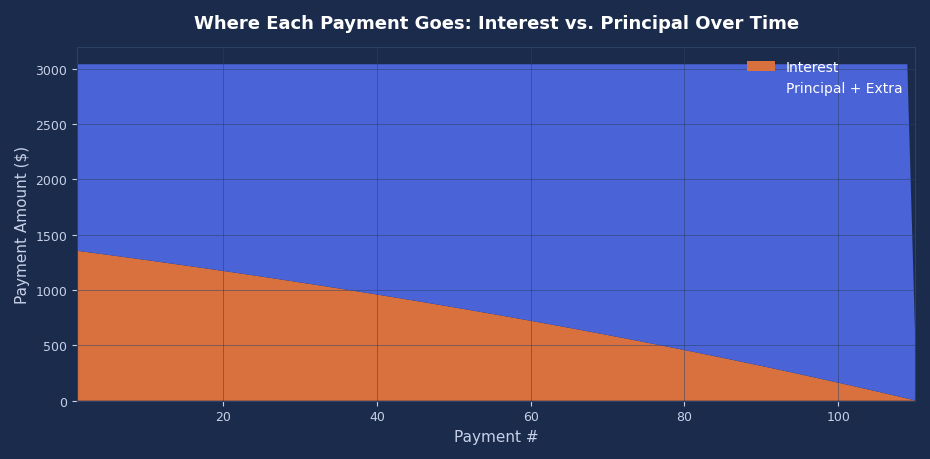
On a fixed-rate, fully amortizing loan, every payment is the same size — but what that payment is made of changes every single month.
Beginning Balance
How much you still owe at the start of that payment period. For the very first payment, this is the full loan amount. After that, it’s whatever balance was left over from the previous payment.
Interest
The beginning balance multiplied by the period interest rate (your annual rate divided by the number of payments per year). This is the cost of borrowing that specific month’s remaining balance — nothing more.
Scheduled Principal
Whatever’s left of your fixed payment after interest is covered. Because interest is calculated on a shrinking balance, the interest portion gets smaller every month and the principal portion gets larger — even though the total payment never changes.
Extra Payment
Any amount you choose to pay beyond the scheduled principal, applied directly to the balance. This is optional — leave it at zero to see your original loan amortization schedule — but it’s the single biggest lever you have for paying less interest overall, since it shrinks the balance that future interest gets calculated on.
Ending Balance
Beginning balance minus scheduled principal minus any extra payment. This becomes next period’s beginning balance, and the cycle repeats until it hits zero — which is your payoff date.
Loan Amortization Schedule vs. a Cash Flow Forecast
An amortization schedule tells you everything about one specific loan — what you owe, what’s interest, what’s principal, and when it’s paid off. A cash flow forecast answers a different question: given everything coming in and going out of the business, including that loan payment, does the cash actually show up when it’s needed to cover it?
In practice, the loan payment row in a cash flow forecast should come directly from the amortization schedule rather than a flat guess, since the payment is fixed but its split between interest (an expense) and principal (a balance sheet reduction, not an expense) matters for anyone also tracking profitability alongside cash. Build the schedule first, then feed the fixed payment amount into the forecast.
How This Fits Into Your Larger Financial Picture
The remaining loan balance from this schedule is exactly what shows up as a liability on your balance sheet — current portion due within 12 months separated from the long-term portion, both pulled straight from the beginning balance column at the relevant future dates. If your balance sheet’s debt figure and your amortization schedule ever disagree, the schedule is the one to trust; it’s the actual math, not an estimate.
For a broader view, a full 3-statement financial model links this same schedule across all three statements at once — the interest portion flows to the income statement, the principal portion reduces the debt balance on the balance sheet, and the total payment appears as a financing outflow on the cash flow statement. That’s the difference between knowing what one loan costs and knowing what it does to the whole business.
Common Loan Amortization Mistakes
A handful of errors come up constantly when people build or read these schedules by hand.
Assuming the payment split stays constant. Because interest is calculated on the remaining balance, the interest-to-principal ratio in month 1 looks nothing like month 100. Using an early payment’s split to estimate your total interest cost badly overstates it.
Confusing an extra payment with a lower required payment. Paying extra toward principal shortens the loan and cuts total interest, but it does not lower next month’s scheduled payment — that stays fixed unless the loan is formally recast. The calculator reflects this correctly: the scheduled payment column never changes, only the payoff date does.
Ignoring how payment frequency changes the math. Monthly, quarterly, and annual payments on the same nominal rate produce different total interest costs, because interest compounds more often with more frequent payments. Always check what frequency a quoted rate actually assumes before comparing loan offers.
Treating the last payment as identical to the rest. Rounding across dozens or hundreds of payments means the final payment is almost never exactly the scheduled amount — it’s whatever’s left to bring the balance to precisely zero. A loan amortization schedule that doesn’t account for this either ends with a small negative balance or an oddly sized final payment; this calculator caps every payment at the remaining balance so it always resolves cleanly to zero.
Forgetting fees aren’t part of amortization. Origination fees, closing costs, and prepayment penalties affect the real cost of a loan but aren’t part of the interest/principal split in a standard amortization schedule. Track those separately rather than folding them into the loan amount, or the interest math stops matching what you’re actually being charged.
How to Use This Calculator
Start with Section 1: enter your loan amount, annual interest rate, term in years, and how many payments you make per year (12 for monthly, 4 for quarterly, 1 for annual). The calculator immediately returns your scheduled payment, total number of payments, and total interest over the life of the loan assuming no extra payments.
To see the effect of paying extra, enter an amount in the “Extra Payment Each Period” field. The summary section updates instantly to show your new payoff date, how many payments you’d skip, and exactly how much interest that extra payment saves over the remaining life of the loan. Section 2 shows the full month-by-month schedule behind those numbers — beginning balance, interest, scheduled principal, extra payment, and ending balance for every payment until the loan is paid off — with the chart on the right tracking the balance down to zero.
Frequently Asked Questions
Why does my payment stay the same but the interest and principal change?
Because interest is charged only on the balance you still owe, and that balance shrinks every payment. Early on, when the balance is largest, most of your fixed payment goes to interest. As the balance drops, less of each payment is needed to cover interest, so more of the same fixed payment goes to principal instead.
Does paying extra every month actually save money, or just shorten the loan?
Both, and they’re the same effect. An extra payment reduces the balance immediately, which means every future interest calculation is based on a smaller number — so you pay less total interest and reach a zero balance sooner. There’s no scenario on a standard amortizing loan where extra principal payments don’t save interest, as long as there’s no prepayment penalty.
What’s the difference between amortization and depreciation?
Amortization (in the loan sense used here) is paying down a debt balance over time. Depreciation is expensing the cost of a physical asset over its useful life for accounting purposes. Confusingly, “amortization” is also used in accounting to describe the equivalent process for intangible assets — but a loan amortization schedule specifically refers to the debt repayment context covered on this page.
Why is my first payment mostly interest?
Because your first payment’s interest is calculated on the full original loan amount — the largest balance the loan will ever have. That’s normal for every fixed-rate amortizing loan, not a sign of a bad rate or a bad deal; it’s simply how the math works when the balance starts at its highest point.
Can I use this for a mortgage, not just a business loan?
Yes — the underlying math is identical for any fixed-rate, fully amortizing loan, whether it’s an SBA loan, an equipment loan, a car loan, or a mortgage. Just enter the actual loan amount, rate, and term from your documents; the calculator supports terms up to 30 years, which covers the vast majority of mortgages as well as business financing.
Download the Free Loan Amortization Schedule Calculator
Download the free loan amortization schedule calculator below — no email signup required. It’s pre-loaded with a realistic sample loan so you can see exactly how the payment splits between interest and principal before clearing it out and entering your own numbers.
Want new templates emailed to you?
No spam. Unsubscribe anytime. Downloads never require this.
Looking for more small business finance tools? Check out our Cash Flow Forecast Template, our Balance Sheet Template, or our Burn Rate and Runway Calculator for related planning tools.
