
Most small businesses don’t lose money on expenses — they lose track of them. A lunch receipt gets shoved in a wallet and forgotten, a software renewal goes unlogged until the credit card statement shows up, and by tax time nobody can say with confidence what was actually spent on travel versus office supplies. An expense report template fixes that by giving every expense one place to land the moment it happens, categorized and totaled automatically instead of reconstructed from memory three months later.
The free expense report template below does the categorizing and adding for you. Log the date, who spent it, what it was for, and the amount — it sorts everything into categories, flags anything missing a receipt, and rolls up a month-by-month summary you can hand straight to your accountant or use for reimbursement.
What’s Inside the Free Expense Report Template
The download has three tabs. The Instructions tab walks through the format and the color legend. The Expense Report tab is the actual log — enter the date, employee, category, description, amount, and whether a receipt is attached, and it totals everything and breaks it down by category automatically. The Category Summary tab rolls those same entries up by month, so you can see at a glance whether travel spending is climbing or software subscriptions are quietly piling up, without re-entering a single number.
Understanding Expense Reports
What an Expense Report Actually Does
An expense report is a running record of what was spent, by whom, on what, and why — built so that someone who wasn’t there can look at it later and understand the spending without asking follow-up questions. That “someone” might be an owner approving reimbursement, an accountant closing the books, or an auditor checking that a deduction is legitimate. The report itself doesn’t move money; it’s the paper trail that justifies the money that already moved, or is about to.
Why It Matters Beyond Reimbursement
A consistent expense report template does more than get employees paid back. It’s what makes a tax deduction defensible if the IRS ever asks for support, it’s how you catch a subscription nobody’s using anymore before it renews for another year, and it’s the first thing a lender or a potential buyer will ask to see when they’re trying to understand your real cost structure. Businesses that only track expenses through a bank statement tend to discover these things months too late — a categorized log catches them while there’s still time to act.
How to Fill Out an Expense Report, Step by Step
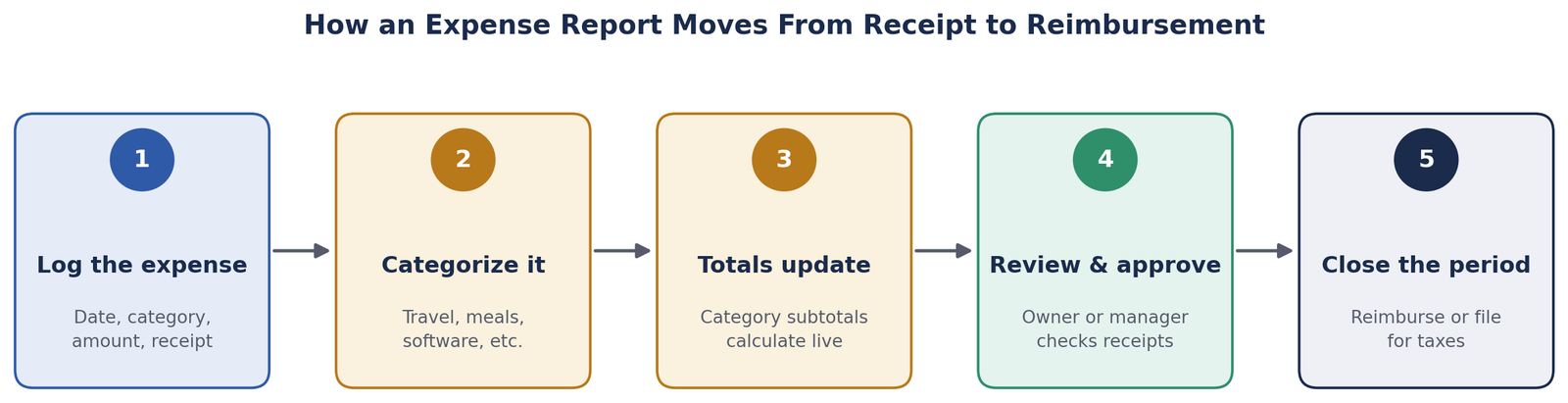
Step 1: Log Every Expense as It Happens
Add a row to the expense report template the same day you spend the money, not at the end of the month. Waiting is how a $40 lunch receipt turns into an unexplained charge nobody can place — the closer you log it to the moment it happened, the more accurate the description and category will be.
Step 2: Choose the Right Category
Pick from the dropdown — Travel, Meals & Entertainment, Office Supplies, Software & Subscriptions, Mileage, Lodging, or Other. Consistency matters more than precision here: if you’re not sure whether a client dinner is “Meals” or “Travel,” pick one and stick with it every time, since the category summary is only useful if similar expenses always land in the same bucket.
Step 3: Attach or Note the Receipt
Mark whether a receipt exists for the expense. This single column does more work than any other field in the template — it’s the first thing an accountant checks, the first thing an auditor asks about, and the fastest way to spot a problem before it becomes one. The template counts how many rows are missing a receipt automatically, so a pattern of “No” answers is visible at a glance instead of buried in a spreadsheet you have to scroll through.
Step 4: Let the Subtotals Do the Math
Once the row is entered, the Expense Report tab’s category subtotals and the Category Summary tab’s monthly totals update on their own. There’s nothing to add up by hand and nothing to reconcile at month-end beyond checking that the total looks right against what you remember spending.
Step 5: Submit for Approval
For a very small team, this usually just means emailing the finished sheet to whoever signs off on reimbursements. Whoever approves it should actually look at the receipt column and the amounts, not just skim the total — that quick check is most of what keeps an expense process honest without adding real overhead.
Common Expense Report Mistakes
Batching a month of receipts into one entry. Lumping “various expenses, $340” into a single row erases exactly the information a category summary is supposed to give you — log each expense separately, even if it takes an extra minute.
Mixing personal and business categories under “Other.” A catch-all category that grows every month usually means the category list needs a new entry, not that more things genuinely don’t fit anywhere — an “Other” subtotal that rivals your biggest real category is a sign to go back and re-sort it.
Recording the amount charged instead of the amount owed. If a business credit card charges in a foreign currency or a reimbursement is partial, log the actual dollar figure you’re accounting for — not a rounded guess — or the totals will drift further from reality every month.
How to Use It
Open the Instructions tab first — it explains the color legend and the category list. Then go to the Expense Report tab, clear out the three sample rows once you understand the format, and start logging your own expenses in the blue-on-yellow cells. The category subtotals below the log and the Category Summary tab both update automatically as you add rows — there’s no button to click and nothing to refresh.
If you need a category the template doesn’t have, add it to the list in column H on the Expense Report tab and it will show up in the dropdown immediately. The Category Summary tab is built around calendar year 2026 by default; if you’re logging a different year, the note at the bottom of that tab shows exactly which formulas to adjust.
Frequently Asked Questions
What’s the difference between an expense report and a receipt log?
A receipt log is just a pile of proof that money was spent. An expense report template adds the structure on top — categorizing each expense, totaling it, and organizing it by period — so the receipts actually answer a question (how much did we spend on travel this quarter?) instead of just sitting in a folder.
How long should I keep expense records?
The IRS generally recommends keeping records that support a deduction for at least three years from the date you filed the related return, longer in specific situations like a filed claim for a loss. The IRS recordkeeping guidance for small businesses covers the exact thresholds if you want the full breakdown.
Do I need a receipt for every expense?
Most companies set a minimum — commonly $25 or $75 — under which a receipt isn’t required and the description field is enough. Above that line, get in the habit of asking for one every time, since card statements rarely show enough detail (a restaurant charge doesn’t say who attended or why), and a receipt is what actually holds up if a deduction or a reimbursement is ever questioned later.
What counts as a reimbursable expense?
That’s a policy decision each business sets for itself, not a fixed rule — but the common thread is that the expense has to be ordinary and necessary for the business, not personal. Write your policy down once (even a short paragraph), share it with anyone submitting expenses, and point to it whenever there’s a gray-area purchase, rather than deciding case by case from memory.
Should mileage be tracked differently from other expenses?
Mileage still belongs in the same log, but log the miles driven and the date of the trip in the description rather than just a dollar figure — you’ll need that detail if you ever have to substantiate the deduction, since the standard mileage rate changes from year to year and a bare dollar amount won’t show how you arrived at it.
Can I use this for personal budgeting instead of a business?
Yes — the category-and-total structure works the same way for personal spending. You’ll likely want to swap the category list (groceries, utilities, entertainment) for something that fits household spending better, which takes about a minute in column H on the Expense Report tab.
Download the Free Expense Report Template
Download the free Expense Report Template below — no email signup required. It comes pre-loaded with a few sample entries so you can see exactly how a filled-out log and its category totals look before you clear them out and start logging your own.
Want new templates emailed to you?
No spam. Unsubscribe anytime. Downloads never require this.
Looking for more small business finance tools? Check out our Accounts Payable Aging Report, Bank Reconciliation Template, and our Budget vs. Actual Analysis guide for comparing what you planned to spend against what actually went out the door.
